Add tax class:
If your state requires you to charge tax to residents of certain states, or you plan to sell internationally, then you should create a tax class for each relevant geographic area.
Add tax class:
|
1 |
Click Settings tab along the top, followed by the Taxes submenu option. |
|
2 |
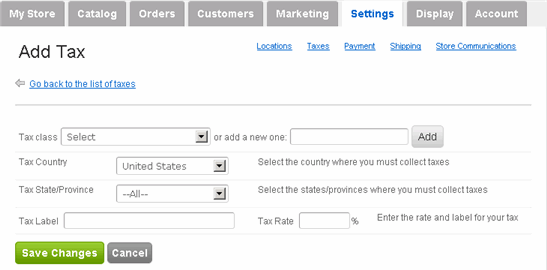
Click Add new tax button on the right side. The Add Tax page appears:
|
|
3 |
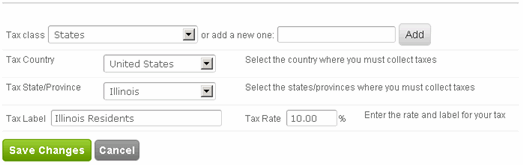
On the Add Tax page, you can either select an previously configured tax class or create a new one. Let's create a new one called States.
Click Add. It should now appear in the dropdown menu.
|
|
4 |
Select Country. For example, US. |
|
5 |
Select State/Province. For example, Illinois. |
|
6 |
Enter a label for this particular instance of this tax class. For example, our test store is located in Illinois and it has to charge Illinois residents tax. So let's label it "Illinois Residents". |
|
7 |
Enter the tax rate. |
|
8 |
In summary, we created a new tax class called "States", selected country and state, labeled this instance of the new tax class and set the tax rate.
|
|
9 |
Click Save Changes. (Repeat with other states as needed.) |