Add New Merchant Manager Users and Set Permissions:
Merchant Manager provides four predefined reports in order to analyze purchase patterns. You can view and download each report.
Add New Merchant Manager Users and Set Permissions:
|
1 |
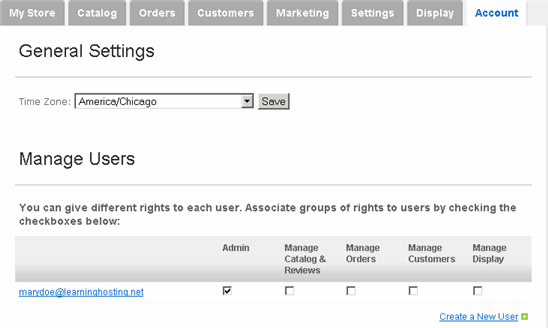
Click Account tab along the top.
|
|
2 |
To create a new user, click Create a New User, enter his/her information and password, and click Create. |
|
3 |
To set the permissions for a user, check one or more of the rights: Manage Catalog & Reviews, Manage Orders, Manage Customers and Manage Display. To give full permissions, check the Admin box. |
|
4 |
To set the Time Zone, select the appropriate one from the dropdown menu under General Settings. Click Save. |