Approve Product Reviews Submitted by Customers:
Customers can rate and write reviews of your products so that it becomes visible to everyone. But in order to make it visible, you must approve it first.
Approve Product Reviews Submitted by Customers:
|
1 |
Click Marketing tab along the top. |
|
2 |
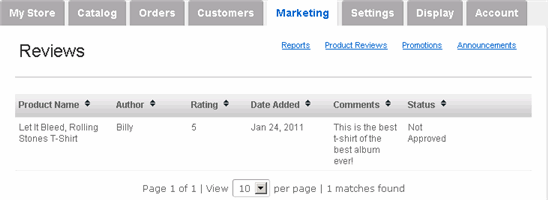
On the Reviews page, you see all customer-submitted reviews and their respective Status.
|
|
3 |
To approve (or edit) a review, hover your mouse over the appropriate review and click its edit link (click delete to delete a non-predefined field). |
|
4 |
If you're satisfied with the review, then change the Approved option to Yes. (If you find it necessary, you could also modify the comment itself.) |
|
5 |
Click Save Changes. The review is now visible on the product page for all customers to see. |